Medical Planner KDP Interior: A Practical Tool for Managing Health and Medical Information
Keeping track of medical appointments, medications, symptoms, and health history can quickly become overwhelming. Whether you are managing your own care or coordinating for a family member, the information accumulates fast. A dedicated system helps you stay organized without relying on memory alone. The Medical Planner KDP Interior provides a structured set of templates designed specifically for this purpose. It gives you a central place to log everything from doctor visits and medication schedules to food intake and mood patterns. Because every template is fully editable on Canva, you can tailor each page to fit your exact needs. This article explores what this planner includes, how it fits into real health management workflows, and practical ways to integrate it into your routine.
What the Medical Planner KDP Interior Offers
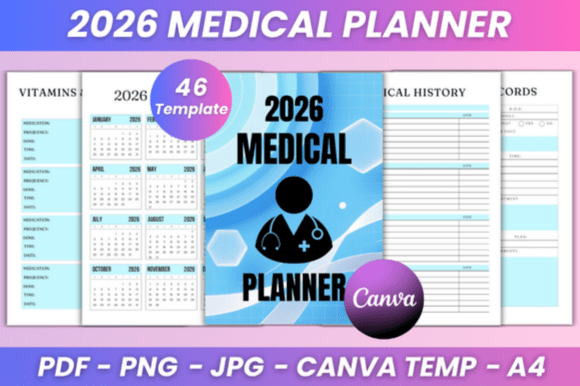
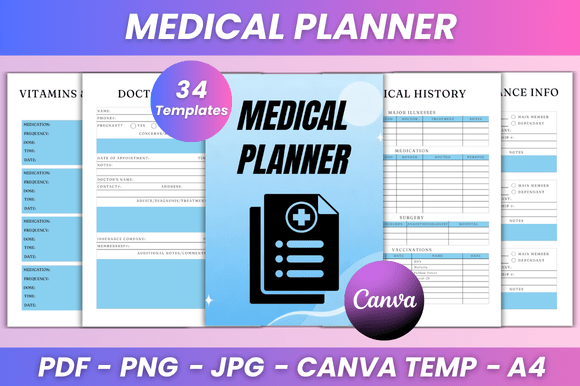
This planner is a collection of 34 pages covering a broad range of health and medical tracking needs. The pages are delivered as editable Canva templates, along with print-ready PDF files, JPG files, and PNG files. The size is A4 (8.3 x 11.7 inches) with no bleed, making it straightforward to print at home or through a service. You get lifetime access and instant download after purchase.
The pages include dedicated sections for vitamins and medications, medical history (two different layouts), doctor visits, doctor records (two pages), doctor appointments, dentist appointments, gynecology appointments, chiropractor appointments, psychologist appointments, general appointments, optician appointments, hospital visits, medical expenses, a first aid kit log, health insurance information, a period tracker, a blood sugar tracker, emergency contacts, a calorie tracker, a food list, a diet log, a water tracker, a sleep tracker, a habit tracker, a mood tracker, a to-do list, two notes pages, and a thank you page. There is also a belongs-to page for personalization.
Because every element is editable in Canva, you can change fonts, sizes, colors, layout style, and even add your own photos. This flexibility means you are not locked into a static design. You can adjust the planner to match your personal preferences or the specific needs of a project, whether that is a personal health binder, a gift for a client, or a product you publish on a platform like KDP.
Where This Planner Fits in a Broader Health Management Process
Health management is not a single event. It is an ongoing process that involves preparation, documentation, review, and adjustment. The Medical Planner KDP Interior supports each phase of that cycle.
Before a medical appointment, you can use the doctor visit pages and medical history templates to compile relevant information. Having a clear record of past symptoms, medications, and test results makes conversations with healthcare providers more productive. You can prepare a list of questions or concerns on the notes pages so nothing gets forgotten during a short appointment.
During treatment or ongoing care, the habit tracker, sleep tracker, water tracker, and food log help you monitor daily factors that affect your health. The blood sugar tracker and calorie tracker are especially useful for those managing diabetes, weight, or metabolic health. The mood tracker adds another layer, allowing you to notice patterns between diet, sleep, exercise, and emotional well-being.
After appointments or procedures, the doctor records pages give you space to document what was discussed, what medications were prescribed, and what follow-up steps are needed. You can log expenses related to visits, track insurance claims, and maintain a record of hospital stays. This documentation becomes invaluable over time, especially if you need to reference past care or share information with a new provider.
The planner also supports periodic review. By looking back at your tracker pages, you can identify trends. Is your sleep consistently poor before a headache? Do your mood scores improve on days you meet your water goal? These observations help you make informed adjustments to your routine.
Integrating the Planner with Other Tools and Resources
The Medical Planner KDP Interior works well on its own, but it also complements other systems you may already use. If you keep a digital calendar for appointments, you can print the appointment pages and use them as a quick reference at home. The medical expenses page can feed into a budgeting spreadsheet or a tax document folder. The health insurance information page is a handy backup to have in printed form, especially if your phone battery dies or you cannot access a digital file quickly.
For those who use a bullet journal, digital notebook, or project management app for health goals, these templates can serve as specialized inserts. You can print only the pages you need and bind them into your existing system. The editable Canva link makes it easy to resize or reformat pages to fit a different binder size or digital tool.
If you are a publisher or content creator, this planner interior can be used as a standalone product on platforms like Amazon KDP. The clean, minimal design appeals to a wide audience, and the editable nature means you can brand it with your own logo or color scheme. You can also combine it with other planners or journals to create a bundle.
Practical Implementation Tips
Getting the most out of this planner starts with a little upfront preparation. Here are some practical steps to integrate it smoothly into your routine.
Decide on Your Format
Do you prefer a printed binder, a spiral-bound notebook, or a digital version used on a tablet? The PDF and image files give you flexibility. If you go with a printed version, consider printing on durable paper and using a binder that allows you to add or remove pages as needed. This way, you can start with just a few core pages and expand over time.
Customize Before You Print
Take advantage of the editable Canva link before committing to a print run. Adjust the fonts to something you find easy to read. Change the colors to match your personal taste or brand. Add your name or a custom header on the belongs-to page. If you plan to print multiple copies or sell the interior, make sure your edits align with your target audience or niche.
Start with the Pages You Need Most
You do not have to use every page immediately. If your main concern is medication tracking and doctor appointments, print those sections first. Add the habit tracker, food log, and water tracker later as you build momentum. Starting small prevents overwhelm and helps you establish a consistent habit.
Pair the Planner with a Simple Review Routine
Set aside 10 minutes at the end of each week to review what you have recorded. Look at your mood tracker and sleep data together. Check if your medication log is complete. Use the notes pages to jot down any questions or observations for your next doctor visit. This weekly check-in turns raw data into actionable insights.
Keep a Master Copy
Save your finalized Canva design as a template. If you run out of a particular page, you can print more copies without having to redo the formatting. This is especially useful for high-use pages like the to-do list or notes pages.
Usability and Long-Term Considerations
The design is clean and minimal, which helps reduce visual clutter. Each page has a clear purpose, and the layouts are straightforward. The variety of tracker pages means you can address multiple aspects of health without needing separate notebooks or apps.
For long-term use, the planner holds up well because it is not tied to a specific year or season. You can start using it at any point and continue indefinitely. The pages are undated, so you can fill them in at your own pace. If you want to track something for three months, simply print enough copies of that page. If you only need it for a short period, you are not wasting pages.
The file formats also support long-term access. PNG and JPG files are widely compatible, and the print-ready PDF ensures consistent output across different printers. The Canva link means you can always go back and make changes if your needs evolve.
Quality Control and Consistency
When printing the PDF files, check that your printer settings match the A4 size (8.3 x 11.7 inches) and that bleed is set to none. Doing a test print of one page confirms the layout and margins before you print the full set. If you are using a professional printing service, provide the PDF files directly for the best results.
For digital use on a tablet, the PNG or JPG files work well with note-taking apps that support image import. You can write directly on the pages using a stylus. The editable Canva link also lets you type directly into the fields if you prefer a fully digital workflow.
Consistency in your tracking matters more than perfection. You do not need to fill in every field every day. The goal is to build a habit that supports your health decisions. Even partial data over time is more useful than no data at all.
Who Benefits Most from This Planner
Adults aged 20 to 50 who are managing their own health or coordinating care for someone else will find this planner practical. Professionals with busy schedules appreciate the appointment tracking and to-do list pages. Freelancers and entrepreneurs who do not have employer-provided health coordination can use the planner to stay on top of their own care. Small business owners who publish on KDP can use the editable interior as a product or lead magnet. Educators and bloggers can incorporate the templates into health or productivity content. Anyone who values a structured, visual approach to organizing medical information will find this useful.
The planner is equally helpful for those managing a specific condition and those who simply want to be more proactive about their general health. The variety of trackers means you can tailor it to your current priorities and expand later.
Final Observations on Using a Medical Planner
A medical planner is only as effective as the consistency with which it is used. The best design in the world will not help if it sits in a drawer. What makes the Medical Planner KDP Interior valuable is that it lowers the barrier to entry. You can start small, customize freely, and print exactly what you need. The editable nature means it adapts to you, not the other way around.
Over time, the data you collect becomes a reliable reference. You can see patterns, prepare better for doctor visits, and make decisions based on real information rather than vague memory. That alone is worth the small investment of time to set it up.
Whether you are using it for personal health management or as a product to share with others, the planner provides a solid foundation. Focus on the pages that matter most to you now, build a simple review habit, and adjust as your needs change. That practical approach turns a set of templates into a genuinely useful tool.