Pet Care Planner KDP Interior: Your Canva Template
For anyone who shares a home with a pet, the chaos isn't just fur on the couch—it's the scattered vaccination cards, the forgotten dates for flea treatment, and the frantic search for the phone number of a reliable pet sitter. The solution isn't just a notebook; it's a structured system that grows with the animal's needs. The Pet Care Planner KDP Interior offers this foundation, but with a crucial twist. It arrives as an editable Canva link, meaning you aren't locked into a rigid design. Whether you are a busy pet parent, a content creator building a digital product suite, or a designer working with pet-focused clients, this is a tool that rewards the time you invest in customization.
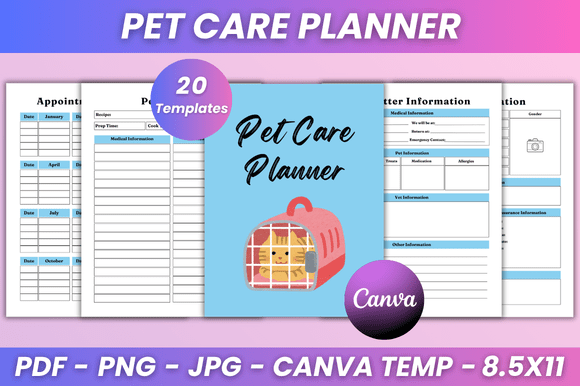
With 20 pages sized at a practical 8.5 x 11 inches, this interior covers the essentials. The immediate value is clear: you get high-quality, print-ready PDF files alongside JPG and PNG formats. But the real story is in the flexibility. You can edit fonts, adjust sizes, swap colors, and even add photos. This isn't a static document; it is a creative scaffold ready for a personal touch.
The Practical Core of the Editable Canva Link
What differentiates this planner from a generic store-bought notebook is the degree of control provided by the editable Canva link. A standard planner forces you into its visual logic. With this KDP interior, you dictate the final look. This is especially powerful for small business owners and freelancers who need to maintain brand consistency across all their client materials.
The feature set is robust. The specification includes a "Belongs To" page, detailed pet and sitter information sections, and record-keeping tools like the Vaccination Record and Preventive Treatment trackers. Having these inside a customizable template means a professional dog walker can input their logo, use their brand colors, and present a polished, cohesive package to their clients. The inclusion of both PDF and image files (JPG, PNG) ensures compatibility with home printers, commercial print shops, and digital note-taking apps like Goodnotes or Notability.
- Print-Ready PDF: Optimized for 8.5 x 11, no bleed, making at-home printing straightforward and error-free.
- Digital Formats: JPG and PNG files allow for easy import into tablets for paperless tracking.
- Lifetime Access: The editable link remains yours, allowing for updates as your brand or needs evolve.
Matching the Template to Different Audiences
One of the strongest arguments for choosing an editable interior is its adaptability across different use cases. The Pet Care Planner KDP Interior is not a one-size-fits-all product; it is a one-size-fits-many system.
For the Pet Business Owner
Imagine you run a grooming salon. The "Grooming Tracker" page is instantly useful, but you can expand its value. In Canva, you can add checkboxes for specific services like de-shedding treatment, nail grinding, or teeth brushing. You can duplicate the "Pet Information" page to create a comprehensive client intake form. By customizing the "Expenses Log" to track your business purchases separately from personal pet costs, you create a niche business tool from a general template. The "Thank You" page becomes a subtle marketing touchpoint—a place to offer a discount code for the next booking.
For the Pet Blogger or Content Creator
Building an email list requires a high-value lead magnet. This interior can be transformed into a niche guide. Highlight the "Pet Recipes" pages and the "Symptom Tracker." Edit the design to match your website's color palette and typography. Offer it as a downloadable bonus for your audience. The clean and minimal design ensures it looks professional, while the editable nature allows you to inject your personal voice into the layout. This moves the template from being a simple giveaway to a strategic asset for audience engagement.
For the Freelance Designer
If you work with clients in the pet space, this template saves hours of layout work. You can purchase the interior, customize it specifically for a pet sitting service or a vet clinic, and deliver a branded product without starting from a blank canvas. The consistent grid and page structure mean you focus on the visual dressing—colors, fonts, photography—rather than the underlying architecture. The editable Canva link makes client revision requests manageable.
Deep Dive into Customizable Pages
A generic checklist is useful. A customized checklist that fits your workflow is transformative. Let's examine how specific pages in this planner can be optimized.
Vaccination Record & Preventive Treatment: These pages are critical for boarding facilities and vet visits. By editing the layout in Canva, you can ensure the dates and signature lines are prominent. You can add a legend or color-code the rows to distinguish between core and optional vaccines. This turns a simple record into a clear communication tool.
Pet Supplies Inventory: This is a page that offers more strategic value than it first suggests. For a pet owner, it tracks what you own. For a business owner, it can be customized to include columns for "Purchase Date," "Vendor," and "Cost." This transforms it into a mini inventory management system. Post-purchase, you can share a link to recommended products directly on the page when you edit it for your audience.
Dog Walking Tracker & Appointment Calendar: Consistency in structure here is key. The Walking Tracker can be edited to include daily goals or notes on behavior during the walk. The Appointment Calendar can be tailored to show either a monthly overview or a weekly breakdown, depending on your client's needs. The clean layout allows for quick scanning, which is essential for someone managing multiple pets.
Maintaining Clarity and Consistency Through Design
When you start editing the Canva link, it is easy to get carried away with decorative elements. However, the most effective planners prioritize function. The "clean and minimal design" of this interior is a strength because it provides a neutral base. Here are a few grounded recommendations for keeping your final product organized:
- Limit your font palette: Choose one bold, readable font for headings and one simpler, highly legible font for the body text. This maintains professional consistency across all 20 pages.
- Stick to a core color scheme: Three colors are usually enough. Pick a primary color, a neutral background, and an accent for highlights or trackers. Using the color picker to match your brand's exact hex codes creates a polished result.
- Utilize the Notes Pages: The "My Notes" and "Notes 2 pages" sections are unassuming but powerful. Consider turning these into reference sheets. Add emergency contact numbers, a list of local vet clinics, or a quick reference for pet weight and dosage guidelines. This adds surprising depth to the planner without requiring complex layout edits.
Maximizing the Digital and Print Experience
One of the practical advantages of this KDP interior is the inclusion of both print and digital formats. Understanding how to deploy each format effectively adds to the perceived value of your final product.
For users who prefer paper, the 8.5 x 11 inches size with no bleed is ideal for standard binders and printers. The high-quality PDF ensures that the lines stay crisp and the text remains clear, even after multiple prints. For the digital-native audience, the PNG and JPG files allow for easy import into note-taking apps. A dog walker can keep the entire planner on their tablet, using the Apple Pencil to fill in walk details on the go.
The "instant download" feature combined with "lifetime access" is a strong selling point. It removes friction from the purchase process. New designs are constantly being added, which encourages users to log back in and explore updated layouts or fresh approaches to the same trackers. This continuous improvement cycle builds long-term value for the end user.
Turning a Template Into a Trustworthy Tool
The final "Thank You" page is more than a formality. It is your opportunity to leave a positive, lasting impression. Whether you are selling this as a product on Amazon KDP or offering it as a freebie on your blog, the tone of this page matters. Keep it genuine. A simple expression of gratitude, coupled with an invitation to explore other designs, feels human and welcoming.
The Pet Care Planner KDP Interior offers a practical starting point for organizing the complex, rewarding task of caring for an animal. The editable Canva link ensures that the final product reflects the specific habits, preferences, and brand identity of the user. It is a structure built for customization, designed to be both functional and flexible. Thanks for your visit, and remember that the best creative tools are the ones that invite you to make them your own.