Content Creator Business Planner: A Practical System for Building and Scaling Your Personal Brand
Disjointed content calendars, scattered ideas, and the constant pressure to post consistently are familiar challenges for anyone building a presence online. The Content Creator Business Planner addresses this directly. It is not a journal or a generic productivity notebook. It is a focused planning system designed specifically for digital creators who need to move from reactive posting to intentional brand building. Whether you are balancing Instagram, YouTube, TikTok, or multiple platforms, this planner offers a structured yet minimal framework to organize your strategy, streamline your workflow, and track what actually drives growth.
Where the Content Creator Business Planner Fits in a Creator's Workflow
Every creator operates within a cycle: ideation, planning, production, publishing, analysis, and iteration. The Content Creator Business Planner sits at the heart of that cycle, serving as the central hub where ideas become actionable plans. It replaces the chaos of random notes, half-filled spreadsheets, and forgotten drafts with a single, organized system.
Think of it as the bridge between your creative vision and the daily execution. Before you record a video or design a graphic, you clarify your niche and brand identity within the planner. During production, you use the weekly content planner and monthly calendar to stay on schedule. After publishing, you turn to the growth analytics tracker and monthly reflection pages to assess what worked and adjust your approach. The planner does not replace your editing software or analytics tools, but it ensures those tools serve a coherent strategy rather than just random activity.
Before You Create: Clarifying Your Vision and Niche
The most common mistake creators make is jumping straight into content production without a clear foundation. The Content Creator Business Planner forces a productive pause before execution. The My Creator Vision page and the Niche Target Audience Clarity section are not fill-in-the-blank exercises. They are strategic tools for defining your direction.
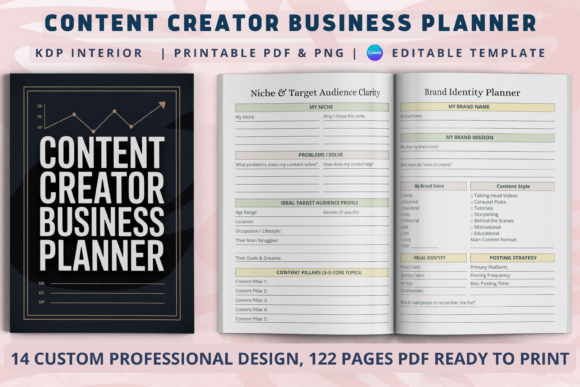
To use this effectively, start by answering the vision prompts as if you were explaining your brand to a new collaborator. What specific problem does your content solve? Who exactly are you trying to reach? What tone and aesthetic define your work? Once these answers are clear, the Brand Identity Planner page helps you codify your visual and verbal style. This preview work reduces the friction that often derails creators midweek when they wonder, "What should I post today?" When your niche and identity are defined beforehand, every content decision becomes faster and more consistent.
Practical Tips for the Preparation Phase
- Spend dedicated time on the vision and niche pages before filling out any content calendars. Rushing this step undermines the entire system.
- Refer back to your brand identity page whenever you feel your content drifting off-message. It acts as a quick alignment check.
- Treat the target audience clarity section as a living document. As your audience evolves, update these pages rather than starting from scratch.
Organizing Content Production: Weekly and Monthly Planning
Consistency is the engine of growth, but consistency without a plan leads to burnout. The Weekly Content Planner and Monthly Content Calendar within the Content Creator Business Planner transform your creative energy into a manageable rhythm.
Start by using the monthly calendar for high-level planning. Block out major themes, campaign launches, seasonal content, or brand collaborations for the month. Then, each week, use the weekly planner to break those themes into specific posts, captions, and production tasks. This two-tiered approach prevents the common trap of planning too granularly too far ahead, while still maintaining structure.
For example, you might decide in your monthly calendar that September focuses on "productivity tools for freelancers." Each week, you then plan specific angles: Monday deep dives into a single tool, Thursday shares a workflow tip, Saturday features a user story. The weekly planner allows you to assign production days, draft deadlines, and publishing times. This separation of macro planning and micro execution makes the workload feel manageable and predictable.
How the Planner Interacts with Your Production Tools
The Content Creator Business Planner works alongside your existing tools, not in competition with them. Use it to decide what to create, then execute in your preferred software. The Video Post Planning Sheet is particularly useful for scripting key points, outlining visuals, and noting hooks before you open your editing app. Similarly, the Content Ideas Brain Dump page acts as a holding space for raw inspiration that you later refine into scheduled posts. Your camera, editing suite, and scheduling app remain the execution layer, but the planner is the decision layer that ensures every piece of content has a purpose.
Tracking What Matters: Monetization and Collaborations
Growth without revenue is a hobby, not a business. The Income Monetization Overview and Brand Collaboration Tracker are where the Content Creator Business Planner shifts from a content tool to a business tool.
The monetization overview should list every revenue stream: affiliate links, sponsored posts, digital products, memberships, coaching, or merchandise. By tracking income sources in one place, you can quickly see which streams are underperforming and where to focus your efforts. The brand collaboration tracker is equally valuable for maintaining professional relationships. Record outreach dates, proposal status, deliverables, payment terms, and follow-up notes. This eliminates the scramble to remember where you left off with each partner.
These pages also inform your content strategy. If a particular type of collaboration consistently generates strong engagement or income, you can feed that insight back into your monthly content calendar. The planner creates a feedback loop where business decisions and content decisions reinforce each other.
Measuring Growth and Refining Your Approach
Analytics are only useful when they lead to action. The Growth Analytics Tracker in the planner is designed for that purpose. Instead of passively recording follower counts or view numbers, pair each metric with a brief observation. What changed in your content style when engagement spiked? Which platform showed the most improvement and why?
The Monthly Reflection page is the natural endpoint of this cycle. Use it to review what you planned versus what actually happened. Did you overcommit on posting frequency? Did a specific topic resonate unexpectedly? Reflection is not about self-criticism; it is about calibration. Over time, these monthly reviews build a personal playbook of what works for your specific audience and niche.
Long-Term Use and Consistency Tips
- Set aside 30 minutes each week to update the planner. Sunday evening or Monday morning works well for most creators.
- Keep the planner accessible during your content creation sessions. Refer to it when you feel stuck or distracted.
- Print fresh copies of key pages as needed. The clean interior design makes it easy to use without visual clutter.
- Use the 122-page PDF version as a digital file if you prefer typing, or print specific pages for analog planning. The choice depends on your workflow, not the tool.
- Revisit your creator vision page every quarter. As your brand grows, your goals and audience will shift. The planner adapts because it is a system, not a one-time template.
Integrating the Planner Across Multiple Platforms
Managing Instagram, YouTube, and TikTok simultaneously often leads to fragmented effort. The Content Creator Business Planner helps unify your cross-platform strategy without adding complexity. Use the content ideas brain dump to capture platform-specific angles for a single topic. For example, a video on "time management for freelancers" might become a YouTube deep dive, a TikTok tip list, and an Instagram carousel. The weekly planner allows you to sequence these variations so they reinforce each other rather than compete.
The growth analytics tracker also works well for comparing platform performance side by side. You can see which platform drives the most engagement per hour invested and adjust your effort accordingly. The planner does not force you to treat each platform equally, it helps you allocate your creative energy where it generates the best return.
Practical Observations for New Users
If you are new to structured planning, start with only a few pages. The full system includes 14 different page types, but you do not need to use every one from day one. Begin with the vision page, the weekly content planner, and the growth tracker. Add the collaboration tracker and monetization overview once your creator business generates regular income. The flexibility of the Content Creator Business Planner lies in its modular design. You scale the planning system at the same pace as your brand.
Another practical observation: the Notes page at the end is more useful than it appears. Use it to capture spontaneous insights during editing sessions, feedback from collaborators, or quick adjustments to posting times. It serves as a catch-all for the unstructured thoughts that surface during execution.
Why Minimal Design Matters for Creators
Creators already face information overload. The clean interior of this planner is intentional. Without decorative elements or complex layouts, the focus remains on the planning itself. You are less likely to abandon a system that feels easy to scan and quick to fill. The minimal approach also makes the planner suitable for printing at home without wasting ink or dealing with formatting issues. Whether you use the Canva editable file to customize branding or the ready-to-upload PDF, the design prioritizes function over ornamentation.
Building Your Creator Business with Confidence
The Content Creator Business Planner is not a magic solution for growth. It is a structured process for turning creative ambition into sustainable output. By clarifying your vision, organizing your production, tracking your monetization, and reflecting on your results, you replace guesswork with intentional decisions. The planner grows with you, from a solo side project to a full-time creator business with multiple revenue streams and brand partnerships.
Start with one month of consistent use. Fill out the vision page, plan one week at a time, and track your numbers. The structure will feel unfamiliar at first, but within a few cycles, it becomes a natural part of your workflow. Staying organized is not about restricting creativity. It is about giving your creativity a reliable container to work within. When your planning runs smoothly, your content creation becomes sharper, your brand becomes stronger, and your business moves forward with clarity.