Your 2026 Craft Business Planner: The Complete Guide to KDP Interiors and Canva Editable Templates
If you run a craft business—whether you sell handmade jewellery, digital printables, custom candles, or crochet items—you already know that staying organized can feel like a full-time job in itself. Between tracking inventory, planning seasonal promotions, managing customer orders, and setting long-term goals, it is easy to lose sight of the bigger picture. That is exactly where a dedicated 2026 Craft Business Planner can make a transformative difference. In this article, we will explore everything you need to know about the 2026 Craft Business Planner, including the differences between a KDP interior version and a Canva editable template, what features to expect, and how to choose the right format for your workflow.
What Is a 2026 Craft Business Planner?
A craft business planner is a structured organisational tool designed specifically for makers, creators, and small-scale product sellers. Unlike a generic daily diary, this planner integrates every facet of running a product-based business: from branding kits and product analysis to budget tracking, competitor research, and marketing campaigns. The 2026 edition is tailored for the upcoming year, helping you map out monthly, quarterly, and annual goals with clarity.
The planner typically includes dedicated sections for:
- Business overview and branding kit – to define your visual identity and mission
- Seasonal promotions and marketing plans – to align your campaigns with key holidays and sales cycles
- Product inventory and order tracking – to keep stock levels healthy and fulfillment smooth
- Income, expense, and profit-loss sheets – to monitor financial health throughout the year
- Social media and advertising trackers – to measure what is working and what needs adjustment
Whether you are a seasoned entrepreneur or just launching your first shop, a well-designed planner acts as both a roadmap and a record-keeping system.
Two Popular Formats: KDP Interior vs. Canva Editable Template
When shopping for a 2026 Craft Business Planner, you will commonly come across two distinct formats: the KDP interior and the Canva editable template. Although they share similar content, their purposes and use cases differ significantly.
What Is a KDP Interior?
A KDP interior refers to a pre-designed, print-ready PDF file created for Amazon's Kindle Direct Publishing platform. Sellers use these interiors to upload and publish paperback or hardcover planners on Amazon. The pages are typically non-editable and designed with standard trim sizes (such as 6x9 or 8.5x11 inches). When you purchase a KDP interior for a 2026 Craft Business Planner, you are essentially buying the layout and design files that you can rebrand and publish under your own author account.
Key characteristics of a KDP interior include:
- Fixed layout with permanent text and design elements
- Print-ready formatting with bleed and margin guides
- No requirement for design software – just upload and publish
- Often sold with a commercial license for resale
This format is ideal if you want to sell physical planners on Amazon without designing every page from scratch. You simply customize the cover, add your branding, and publish.
What Is a Canva Editable Template?
A Canva editable template, on the other hand, is a digital file that you can open and modify using Canva (a free online design tool). You can change text, colours, fonts, and even rearrange sections to suit your business. This format is best for personal use or for creating custom planners for clients.
Typical features of a Canva editable template include:
- Fully customisable text and design elements
- Ability to duplicate, delete, or reorder pages
- Instant download as PDF or image files after editing
- Suitable for printing at home or at a local print shop
If you want a planner that adapts to your specific products, services, and branding, a Canva editable template gives you the flexibility to make it your own.
Understanding the Core Sections of the 2026 Craft Business Planner
Regardless of the format you choose, a comprehensive craft business planner should include a robust set of pages. Let's walk through the most important sections and how they support your business activities.
Business Foundation Pages
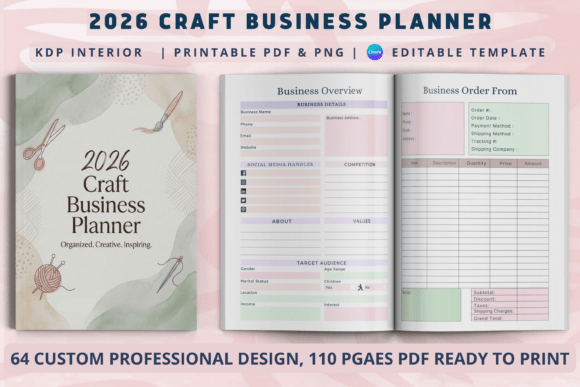
These initial pages help you articulate your brand identity and set the stage for the year ahead. The Cover Page and This Book Belongs to Page are simple but essential for ownership and professionalism. The 2026 Calendar and 2026 Holiday List give you a bird's-eye view of important dates, while the Yearly Planner allows you to block out major milestones.
The Business Overview and Branding Kit sections are where you define your logo colours, fonts, and brand voice. These pages are invaluable when you need to stay consistent across your website, packaging, and social media.
Product and Order Management
For craft sellers, tracking products and orders is a daily necessity. The Order Form and Order Tracker help you record customer details, item variations, and shipping status. The Product Analysis page lets you evaluate which items sell best and which underperform, so you can adjust your Collection Ideas accordingly.
The Price List and Product Inventory sections work together to ensure you never run out of popular materials or finished goods. You can also use the Inventory Tracking page to monitor raw materials separately.
Marketing and Promotion
Many craft businesses struggle with consistent marketing. The Marketing Plan and Seasonal Promotions pages help you plan campaigns around holidays, craft fairs, and online sales events. The Social Media Planner comes with space to schedule posts, track engagement, and brainstorm content ideas. The Campaign Manager and Advertising sections allow you to monitor paid ads and sponsored posts, so you know exactly where your budget is going.
The Target Customer Market page encourages you to define your ideal buyer persona, which is a step many beginners skip. Clarifying who you are selling to makes every marketing decision more effective.
Financial Tracking Pages
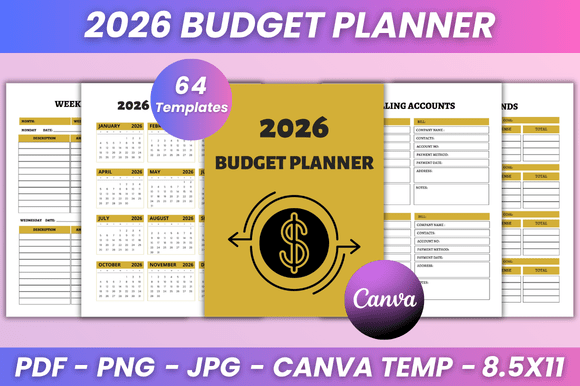
Financial organisation is often the weakest area for small business owners. The 2026 Craft Business Planner addresses this with a suite of dedicated pages: Budget Tracker, Income Tracker, Expense Tracker, Annual Finance, Annual Profit Loss, Monthly Sales, Sales Tracker, and Profit Tracker. These sections allow you to record every transaction, categorize spending, and calculate net profit at a glance.
The Tax Deduction and Coupons Discounts pages are especially useful at tax time. By keeping a running list of deductible expenses and any discounts you offer customers, you reduce stress during tax season and can make informed pricing decisions throughout the year.
Operational and Growth Pages
Beyond day-to-day tasks, the planner includes pages that encourage strategic thinking. The Project Planner, Website Planner, and Launch Your Shop sections help you break big initiatives into manageable steps. The Long-Term Business Goals and Goal Action Plan pages prompt you to set quarterly and annual targets, then create action steps to reach them.
The Competitor Analysis page is often overlooked but highly valuable. By regularly reviewing what other sellers in your niche are doing, you can spot gaps in the market and differentiate your offerings. The Suppliers List ensures you never waste time searching for contact details when you need to reorder materials.
Who Can Benefit from the 2026 Craft Business Planner?
This planner is designed for a wide range of users, from hobbyists turning their passion into profit to established small business owners who want to streamline their operations. It is particularly well-suited for:
- Handmade sellers on Etsy, Amazon Handmade, or independent websites
- Digital product creators who sell printables, templates, or educational materials
- Event vendors who participate in craft fairs, farmer's markets, or pop-up shops
- Side hustlers who manage their craft business alongside a full-time job
- Print-on-demand sellers who need to track designs, suppliers, and ad campaigns
If you are someone who loves the idea of a structured system but struggles to create one from scratch, this planner gives you a ready-made framework. You simply fill in the blanks and follow the prompts.
How to Choose Between a KDP Interior and a Canva Editable Template
The choice between a 2026 Craft Business Planner KDP Interior and a 2026 Craft Business Planner Canva Editable Template depends on your goals.
Choose a KDP interior if:
- You want to publish and sell physical planners on Amazon
- You prefer a fixed, professionally designed layout that requires minimal effort
- You plan to use the same design for multiple editions or niches
- You have no desire to edit the interior pages yourself
Choose a Canva editable template if:
- You need a planner for your own business use
- You want to customize colours, sections, and text to match your brand
- You plan to print copies for yourself or your team members
- You offer planning services to clients and want to create bespoke planners
Many savvy entrepreneurs actually use both. They purchase a Canva editable template to design their personal planner and then use a KDP interior to publish a commercial version for their audience. This dual approach saves time and maximizes the value of each purchase.
Common Misunderstandings About Business Planners
Some people assume that a planner is only useful if you have a large team or complex operations. In reality, even solo business owners benefit from having a centralised system. Another misconception is that digital tools are always better than paper planners. While apps and spreadsheets work for some, many creative entrepreneurs prefer the tactile experience of writing things down. The 2026 Craft Business Planner can be printed and used in a physical binder, or filled digitally using a tablet and stylus if you use the Canva editable version.
It is also worth noting that a planner does not replace the need for accounting software or a CRM. Instead, it serves as a practical companion that keeps your daily, weekly, and monthly tasks visible and manageable.
Practical Tips for Getting the Most Out of Your Planner
To truly benefit from your 2026 Craft Business Planner, consistency is key. Set aside 10–15 minutes each day or 30 minutes each week to update your pages. Use the Weekly To Do List to break down larger goals into actionable steps. Review the Annual Profit Loss and Monthly Sales sheets at the end of each month to identify trends early.
Keep your planner accessible. If you use the printed version, place it near your workspace. If you use the digital version, store it in a cloud folder you check regularly. The more you treat the planner as a living document, the more value you will extract from it.
Also, do not hesitate to adapt the sections to your needs. A Canva editable template allows you to add extra pages for notes, swap out trackers, or change the order of sections. The goal is not to fill every page religiously, but to use the structure that supports your unique workflow.
Why the 2026 Edition Matters
A new year brings new opportunities, and having a planner specifically dated for 2026 helps you stay current. The 2026 Holiday List includes up-to-date dates for Easter, Mother's Day, Black Friday, and other key retail moments. The Seasonal Promotions pages let you plan months in advance, so you never miss a crucial sales window.
As the craft industry continues to grow, standing out requires strategic planning. A dedicated planner shifts your focus from reacting to problems to proactively building a thriving business. Whether you choose the KDP interior for commercial publishing or the Canva editable template for personal use, the 2026 Craft Business Planner equips you with everything you need to succeed.
Final Thoughts
Running a craft business is deeply rewarding, but it demands organisation, creativity, and financial discipline. The 2026 Craft Business Planner brings all these elements together in one cohesive tool. From the Cover Page to the Suppliers List, every section serves a practical purpose that supports your entrepreneurial journey.
Take the time to explore both the KDP interior and Canva editable template options. Consider your end goal: are you publishing a product or creating your own system? Once you decide, you can customise the planner to fit your brand and workflow perfectly. With the right planner in hand, 2026 can be your most organised and successful year yet.
Start your journey today, and let the 2026 Craft Business Planner be the foundation upon which you build your creative empire.