Daily To-Do List Task Organizer
Most of us carry a mental list of tasks we intend to finish, only to reach the end of the day wondering where the time went. The gap between intention and completion is rarely about laziness. More often, it is about structure. A well-designed organizer bridges that gap by giving each task a clear time and place. The Daily To-Do List Task Organizer is built exactly for that purpose: to turn a scattered list of responsibilities into a manageable, visually clear plan you can actually follow.
What Makes This Organizer Different
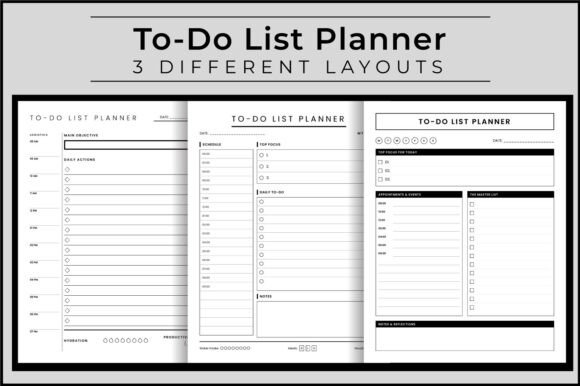
At first glance, you might think a to-do list is just a to-do list. But the difference lies in how the information is laid out and how easily your eye can move from one section to the next. This particular organizer offers three distinct layouts, each housed in its own 120-page PDF file. That means you get 360 pages of structured planning space, all formatted at a standard 8.5″ x 11″ size with no bleed, ready to print on any home or office printer.
The design is clean and uncluttered. There are no distracting graphics, heavy borders, or decorative flourishes that eat up space or make the page feel busy. Instead, the focus stays on the content you put in. The visual personality is professional and straightforward, which makes it suitable for both personal and business use. Whether you are a freelancer tracking client deadlines or a parent managing household errands, the layout supports you without getting in the way.
Layout Variety Without Overwhelm
One of the strongest features here is the inclusion of three different page structures. People work differently. Some prefer a chronological timeline, while others like to group tasks by priority. Having three options means you can test each one and settle on the format that matches your natural workflow. Alternatively, you can rotate between them depending on the type of day you are facing. A heavy meeting day might call for a schedule-focused layout, while a deep work day benefits from a priority-driven design.
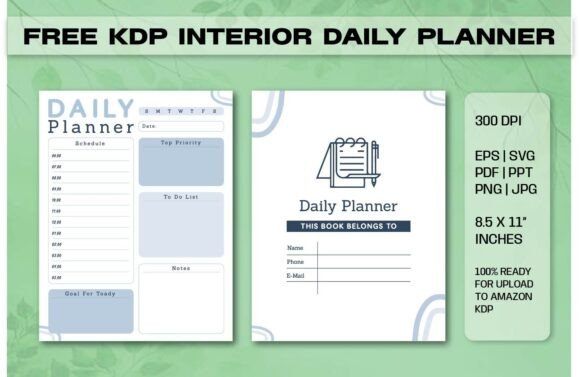
Each layout includes dedicated sections for Daily Actions, Schedule, Top Focus, Daily To-Do, Appointments & Events, a Master List, and even a Hydration Tracker. These aren't just generic boxes. They are spaced and sized to be practical. You can write legibly without squeezing words into tiny fields. The 300 dpi resolution ensures that printed text remains sharp, whether you use a ballpoint pen, a fine-liner, or a fountain pen.
How Different Professionals Use It
Because the design is intentionally neutral and professional, it adapts well across many fields. Here is how different audiences tend to integrate it into their daily routines.
Entrepreneurs and Small Business Owners
When you run a business, your to-do list is never just personal. It includes client work, invoices, marketing tasks, team check-ins, and long-term strategic goals all mixed together. The Daily To-Do List Task Organizer helps separate those layers. The Master List section captures everything that needs attention, while the Top Focus area forces you to identify the one or two items that truly move the needle. The Appointments & Events section keeps client meetings and deadlines visible so nothing slips through.
Content Creators and Bloggers
Creative work is often harder to schedule than administrative work. You cannot always force inspiration on a timeline. But you can structure the environment around it. Many content creators use the Daily Actions section to block out focused writing or recording time and use the Schedule section for editing, publishing, and promotion tasks. The Hydration Tracker might seem small, but when you are in a flow state for hours, it is a practical reminder to step back and reset.
Designers and Creative Professionals
For designers, the visual quality of the tools they use matters. Even a simple planner should feel cohesive and well-proportioned. This organizer uses clean lines and generous white space, which mirrors the principles of good editorial design. It does not fight for attention with the content you write. That restraint is a sign of thoughtful layout work. Whether you are managing client revisions, project milestones, or personal creative projects, the structure supports clarity without feeling rigid.
Practical Guidance for Choosing and Using This Organizer
If you are considering adding this organizer to your workflow or even preparing it for publication through a platform like Amazon KDP, a few practical points deserve attention.
Evaluating Fit for Your Workflow
Before committing to a full 120-page printout, print a single page of each layout and test it for a few days. Pay attention to how your eye moves across the page. Do you naturally fill in the Schedule section first, or do you jump to the Master List? The layout that feels most intuitive is likely the one you will stick with long term. The beauty of having three distinct designs is that you can mix them into a single binder and choose the right one each morning based on the kind of day ahead.
Printing and Binding Options
The file comes ready to print at 8.5″ x 11″ with no bleed, which makes it straightforward to handle at home or at a print shop. Because the resolution is 300 dpi, the text and lines remain crisp even if you reduce the scale slightly to fit a different paper size. For those publishing through KDP, the no-bleed format saves setup time and avoids common trim errors. You can spiral bind, ring bind, or simply three-hole punch and drop into a binder. The flexibility is intentional.
Customization Without Complexity
The sections are clearly labeled, but nothing stops you from repurposing them. The Hydration Tracker can also track something else entirely, like pages read, minutes exercised, or client calls made. The Daily Actions box works equally well for gratitude journaling or a quick brain dump. The layout gives you a container, but you control the content. That makes it suitable for people who like structure but also want room to adapt.
How Layout Influences Readability and Follow-Through
This is where the design decisions behind the Daily To-Do List Task Organizer become most apparent. Readability is not just about font choice or line spacing, though those matter. It is about how quickly you can scan the page and understand your priorities. A well-structured layout reduces cognitive load. When you open your planner, you should not have to search for where to write your most important task. It should be immediately obvious.
The Top Focus section sits prominently in each layout. That placement is intentional. It forces a decision early in the planning process. Before you get lost in the details of appointments and minor tasks, you identify the one thing that must happen today. That single act shifts your entire day from reactive to intentional. The consistency of this placement across all three layouts means that even if you switch formats, you never lose the core discipline of prioritization.
Building a Consistent Planning Habit
Consistency is the real secret to productivity. A planner that looks good but feels awkward to use will be abandoned within a week. This organizer avoids that trap by keeping the interaction simple. You write. You check. You move on. There are no complicated key systems, color-coding requirements, or multi-step setup processes. The clean visual style supports the habit rather than complicating it. Over 120 pages, that simplicity matters. You are not fighting the tool; you are using it.
Commercial and Publishing Considerations
For those who create and sell planners, whether on Amazon KDP or through their own store, the technical specifications of this product are worth noting. The 8.5″ x 11″ size is the standard for US letter paper, which means minimal printing costs and maximum compatibility with both home printers and commercial print-on-demand services. The 300 dpi resolution ensures that previews and physical copies look professional, which directly affects customer trust and reviews.
The three JPG files included alongside the PDFs are useful for mockups, previews, and marketing materials. You can show potential buyers exactly what the interior looks like without them needing to download and open a PDF. That small detail can improve conversion rates because it reduces friction in the decision process. The no-bleed format also simplifies the upload and approval process on KDP, where bleed-related rejections are a common headache for new publishers.
Because the product is ready to upload with no additional formatting required, it saves hours of setup time. The three layouts give you variety to market to different customer segments. A customer who needs a strict hourly schedule may prefer one layout, while a parent managing family logistics may gravitate toward another. By offering all three in a single product, you increase perceived value without increasing production complexity.
Small Details That Make a Difference
The inclusion of a Hydration Tracker might seem like a minor feature, but it reflects a broader design philosophy. Productivity is not just about tasks. It is about energy, focus, and physical well-being. Small reminders to drink water, take breaks, or check in with yourself are the kind of touches that separate a thoughtful planner from a generic one. Similarly, the Master List section acts as a catch-all for everything that does not fit neatly into today's schedule, reducing the anxiety of forgetting something important.
The page count of 120 pages per layout is also a deliberate choice. That gives you roughly four months of daily pages in each format, or a full year if you rotate between them. It is long enough to build a consistent habit but short enough to feel manageable. You are not overwhelmed by the weight of an annual planner, yet you have enough space to see real progress over time.
Final Practical Recommendation
If you are someone who has tried digital task managers and found them easy to ignore, or if you have purchased planners in the past that felt too restrictive or too vague, this organizer is worth testing. Start with one layout. Print ten pages. Use them for ten days. Pay attention to whether you actually reference the page throughout the day. Notice if the structure helps you complete more tasks or if it simply adds another step to your morning routine.
The best tool is the one you actually use. The Daily To-Do List Task Organizer is designed to stay out of your way while keeping your priorities visible. It does not promise to make you more productive by magic. It simply provides a clear, well-proportioned space to plan your day. What you put into that space is entirely up to you.