Nursing Student Planner KDP Interior: A Complete Guide
If you're a nursing student juggling lectures, clinical rotations, exams, and personal life, you already know how quickly things can slip through the cracks. Between tracking patient hours, memorizing pharmacology terms, and keeping up with assignment deadlines, a solid organizational system isn't just helpful—it's essential. That's where the Nursing Student Planner KDP Interior comes in, offering a ready-made framework that you can customize to match your exact needs. Whether you're publishing your own planner as a low-content book or setting up a personal system for yourself, this template gives you a flexible starting point.
What Makes This Planner Different for Nursing Students
Nursing programs demand a unique blend of academic rigor and practical skill development. A generic planner often misses the mark because it doesn't account for clinical schedules, medical information tracking, or study habits specific to healthcare education. The Nursing Student Planner KDP Interior addresses this gap directly, with dedicated sections for everything from daily subject tracking to exam preparation.
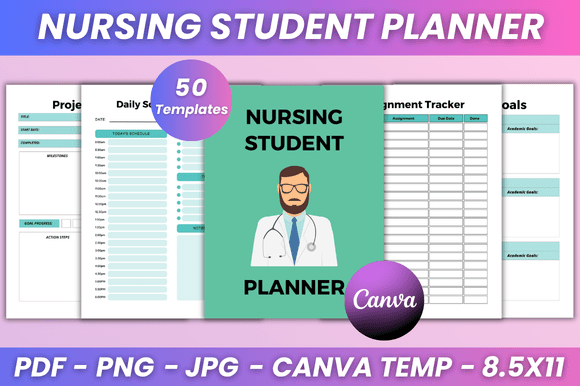
The beauty of this template lies in its completeness. You get over thirty distinct trackers and planners, all housed within a single editable Canva file. That means you can tweak fonts, colors, layout styles, and even add your own photos to make it feel truly yours. And because it's designed for KDP (Kindle Direct Publishing), the final output is print-ready at 8.5 x 11 inches, with high-quality PDF, JPG, and PNG files included.
Core Features That Actually Matter
When you look at the specifications, it's easy to get overwhelmed by the sheer number of trackers. But each one serves a specific purpose in the nursing school journey. Let's break down the ones that make the biggest difference.
Daily and Weekly Schedule Planners
Clinical rotations don't follow a standard 9-to-5 schedule, and your planner shouldn't either. The daily schedule and weekly planner sections let you map out shifts, classes, study blocks, and personal time in a way that works for your unique week. You can edit the time slots in Canva to match whether you're on morning rounds, night shifts, or weekend clinicals.
Exam and Study Trackers
The exam tracker, study tracker, and examination schedule work together to keep you ahead of test dates. Nursing exams like the NCLEX or HESI require months of preparation, and having a dedicated space to log study hours, topics covered, and practice test scores helps you identify weak areas before they become problems. The grade tracker detailed section goes beyond simple letter grades, allowing you to break down performance by subject or competency.
Medical Information and Breathing Tracker
This is where the planner shows real insight into nursing student life. The medical information section is perfect for logging patient details during clinicals (in a HIPAA-compliant way, of course) or tracking your own health data during a demanding semester. The breathing tracker might seem unusual at first, but any nursing student who's faced a high-stress simulation lab or a challenging patient interaction will appreciate having a built-in tool for mindfulness and stress management.
Assignment and Grade Management
From the assignment ledger to the project planner, these sections help you break down large assignments into manageable steps. Nursing programs are notorious for group projects, care plans, and research papers that pile up simultaneously. The group contact details section ensures you can reach your study partners quickly, while the assignment grade tracker keeps you honest about your current standing in each course.
Practical Applications Beyond Personal Use
While the Nursing Student Planner KDP Interior is obviously valuable for individual students, its applications extend into several other areas.
For nursing educators and program coordinators: You can customize this template to create a standardized planner for your entire cohort. Edit the Canva link to add program-specific deadlines, clinical rotation schedules, and institutional resources. Distribute it as a PDF at the start of the semester, and your students will have a consistent organizational tool that aligns with your curriculum.
For KDP publishers and content creators: This template is a ready-to-publish product. With the included Canva link, you can modify the design, add your branding, and upload it to Amazon KDP as a low-content or medium-content book. The print-ready files save you hours of formatting work, and the variety of trackers means you're offering genuine value to nursing students who are actively searching for organizational tools.
For academic coaches and tutors: If you work with nursing students, you can use this planner as a coaching tool. Sit down with a student, help them set up their semester goals, populate the study habits tracker, and create a realistic weekly schedule. The planner becomes a living document that supports the strategies you're teaching.
How to Customize the Template in Canva
One of the strongest selling points of this product is that every template is fully editable in Canva. Even if you've never used Canva before, the learning curve is gentle. Here's how to make the most of it.
Start by opening the editable Canva link. You'll see all the pages laid out in a clean, organized format. The belongs to page is your first task—add your name, course, and contact details to make the planner feel personal. From there, you can adjust fonts to something more readable (sans-serif fonts work well for planners), change colors to match your school colors or personal preference, and resize elements if needed.
The layout style is adjustable too. If you prefer a minimalist look, remove decorative elements and stick to clean lines. If you're creating this for a younger audience or a creative nursing program, add photos or illustrations that reflect the energy of the cohort. The flexibility is there, and it's all done through drag-and-drop editing.
Realistic Scenarios: When This Planner Shines
Let's imagine a few real situations where this planner proves its worth.
Scenario one: You're a second-semester nursing student with five classes, two clinical days per week, and a part-time job. On Monday morning, you open your planner to the weekly schedule and block out your clinical hours, class times, and work shifts. You notice a gap on Thursday afternoon and use the study tracker to schedule two hours of pharmacology review. Later that week, you use the assignment tracker to check the status of your care plan due next Friday. Without this system, something would likely slip—and in nursing school, that something could be a grade or a clinical requirement.
Scenario two: You're publishing planners on Amazon KDP. You take the Nursing Student Planner KDP Interior template, adjust the colors to a calming blue-green palette, add a professional cover in Canva, and upload the print-ready files. Within a few days, you have a listing live that targets nursing students specifically. Because the template includes specialized sections like the textbook tracker and subject resources tracker, your listing stands out from generic student planners.
Scenario three: You're a study group leader. You customize the planner with your group's meeting schedule, shared goals, and contact details. Each member gets a copy, and you collectively use the study habits tracker to hold each other accountable. The group contact details page ensures you can always reach someone for last-minute study sessions before exams.
Tips for Getting the Most Out of the Template
Don't feel pressured to use every single tracker from day one. Start with the core essentials: the daily schedule, assignment tracker, and exam tracker. Once those become habit, add the study habits tracker or the reading list. Overloading yourself with too many tracking systems at once can lead to burnout. The planner is a tool to reduce stress, not increase it.
If you're publishing this as a KDP interior, consider adding a brief instruction page at the front. Explain how to use each tracker in a nursing context. For example, the book to buy section might include textbooks as well as NCLEX prep books. The library book tracker could be repurposed for reserving study rooms or tracking borrowed simulation lab materials. Showing potential buyers how to use the pages adds perceived value and reduces returns.
For personal use, print the pages you need most frequently and keep them in a binder. You don't have to print the entire 30+ page document every week. The breathing tracker and goal tracker, for instance, might be monthly check-ins rather than weekly tasks. Tailor the format to your actual workflow.
Practical Considerations Before You Start
File quality matters when you're dealing with print-ready products. This template provides high-resolution PDF, JPG, and PNG files at 8.5 x 11 inches. That's standard letter size, which works with most home printers and professional printing services. If you're publishing through KDP, this exact size is compatible with their trim specifications.
The editable Canva link means you don't need advanced design software. A free Canva account will give you access to the template, though some fonts or elements might require a Canva Pro subscription. Check the template details before you start editing to avoid surprises. If you're on a budget, stick to the free font options and avoid premium stock photos.
Think about binding as well. Spiral binding allows the planner to lay flat, which is useful when you're at a desk or clinical station. If you're printing at home, consider a three-ring binder with page protectors for trackers you'll use repeatedly, like the weekly schedule.
Who Benefits Most from This Product
Honestly, any nursing student from first-year through final semester can use this planner effectively. The variety of trackers means you can scale your usage up or down depending on your current workload. Pre-nursing students might focus more on the study habits and reading trackers, while senior students preparing for the NCLEX will lean heavily on the exam tracker and subject resources.
KDP publishers are the other obvious audience. If you sell low-content books, adding a nursing-specific planner to your catalog opens up a niche with consistent demand. Nursing programs don't change dramatically year to year, so your product remains relevant. The editable Canva link also means you can update the design without starting from scratch, keeping your listing fresh.
Academic advisors and nursing program administrators can also benefit. Instead of creating a planner from scratch for incoming students, you can customize this template with school-specific information and distribute it digitally or in print. It projects a professional, organized image and gives students a tool that supports their success from day one.
Final Thoughts on Choosing This Planner Template
The Nursing Student Planner KDP Interior isn't just a collection of pages—it's a system designed for the specific challenges of nursing education. The trackers for medical information, breathing, study habits, and clinical schedules reflect an understanding of what nursing students actually need. Combined with the flexibility of Canva editing and the print-ready file formats, this template offers real value whether you're organizing your own semester or creating a product to sell.
If you decide to use it, start small, customize it to your specific program, and remember that the goal is to make your life easier, not more complicated. A well-organized planner can be the difference between feeling overwhelmed and feeling in control. And in nursing school, feeling in control is half the battle.