Complete Craft Project Planner: Organize Every Creative Idea
Creativity thrives when you have room to breathe, but without a clear system, even the best ideas can get lost in the shuffle. If you have ever started a craft project with excitement, only to lose track of supplies, deadlines, or the next step, you already know the frustration. The Complete Craft Project Planner was built to solve that exact problem. It offers a structured yet flexible way to capture, plan, and finish your creative work — whether you are a hobbyist making gifts for friends or a shop owner juggling multiple orders.
This planner is not a rigid template that forces you into someone else’s workflow. Instead, it adapts to the way you naturally work. With spaces for everything from big-picture creative goals down to daily task lists, it helps you see the full journey of a project without feeling overwhelmed. The result is a calmer, more focused creative process where nothing slips through the cracks.
What Makes the Complete Craft Project Planner Different
Many planners focus on one area of life — appointments, finances, or general tasks. This one is built specifically for making things. It acknowledges that a craft project involves materials, budgets, team members, timelines, and often shifting priorities. Instead of forcing you to adapt a generic planner to your needs, it comes with dedicated sections that speak directly to the way makers work.
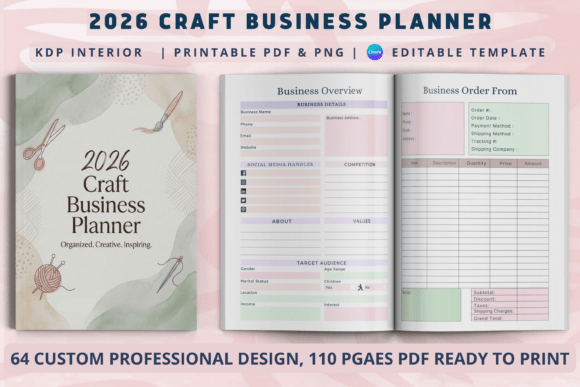
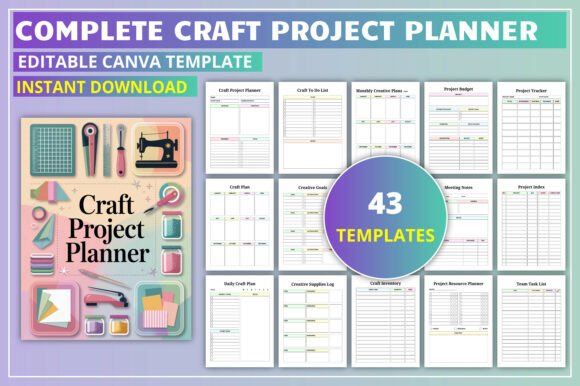
Inside, you will find areas for project planning, resource tracking, budget management, and even client communication logs. For someone selling on Etsy or managing custom orders, that last piece alone can save hours of confusion. But the planner also leaves room for the playful side of creativity: a vision board, bucket list, and creative goals section where you can dream without limitation.
All of this comes in a format that is fully editable in Canva. You can change colors, fonts, layouts, icons, and backgrounds to match your brand or personal style. That flexibility means the planner can grow with you — whether your aesthetic shifts or your business rebrands.
Who Benefits Most From This Kind of Planner
The short answer is anyone who makes things with their hands and wants to do it more intentionally. But let’s look at a few specific profiles to see why this tool might resonate.
- The Etsy shop owner who manages multiple custom listings, each with its own materials, deadlines, and client preferences. A single glance at the client project log and communication tracker can replace a dozen scattered messages.
- The DIY enthusiast who has several half-finished projects around the house and wants a clear path to completion. Project planner pages and task workflows help break overwhelming goals into manageable steps.
- The creative entrepreneur running a small handmade business. Budget trackers and deadlines pages keep finances and time commitments visible, reducing the risk of overpromising or overspending.
- The beginner crafter just discovering the joy of making. Getting started pages and a simple craft to-do list provide gentle structure without pressure.
Even educators teaching craft-based classes or bloggers creating DIY tutorials will find value in the project index and resource planner sections. When you can see every piece of a project laid out in one place, you spend less time searching and more time creating.
A Practical Walkthrough of Key Sections
Rather than describing every page in abstract terms, let’s walk through how someone might actually use the planner for a real project. Imagine you have decided to sew a batch of custom tote bags for an upcoming market. Here is how the Complete Craft Project Planner can support each phase.
First, you turn to the Creative Goals and Vision Board pages. You sketch out the vibe you want for the bags — colors, fabrics, shapes — and note your goal: sell twenty bags in one day. This big picture keeps you motivated when the sewing gets tedious.
Next, you move into the Project Planning Management section. You create a project entry for the tote bags, set a deadline (market day), and estimate your budget for fabric, thread, and hardware. The Project Budget page helps you track every expense, so you know exactly how much profit each bag needs to bring.
Then you head to the Task Workflow and Craft To-Do List. You break the project into steps: buy materials, cut fabric, sew linings, attach handles, add final details, pack for market. Each task gets a checkbox and a priority level. As you complete steps, you mark them off — a small but deeply satisfying act.
Closer to market day, you use the Weekly Plan and Craft Calendar to schedule sewing sessions around your other commitments. The Daily Craft Plan tells you exactly what to focus on each day, removing the mental load of deciding what to do next.
After the market, you return to the Project Tracker to note what worked and what you would change next time. This reflection turns every project into a learning experience, making you more efficient with each iteration.
Why Canva Editability Matters for Real Use
One of the most practical features of this planner is that it comes fully editable in Canva. You might wonder why that matters for a printable planner. The reason is simple: no two crafters work the same way.
Maybe you prefer a minimalist black-and-white layout, or perhaps you want bright, cheerful colors that match your brand. Maybe you need extra project budget pages but fewer vision board pages. With the Canva editable files, you can duplicate, remove, or rearrange sections freely. You can also resize elements, change fonts to something more readable, or add your own icons. This level of customization means the planner fits you, not the other way around.
Additionally, because the planner is available in PDF, JPG, and PNG formats, it works across devices and printing setups. You can keep a digital copy for quick edits, print a physical binder version for your workspace, or even upload individual pages to your tablet for paperless planning. The KDP-ready interior format also makes it easy for anyone selling planners on Amazon to repurpose the design.
Important Considerations Before You Start Using It
No tool is a magic solution, and this planner is no exception. To get the most out of it, a few things are worth keeping in mind.
First, the planner works best when you use it consistently but not obsessively. You do not need to fill every page for every project. Some projects might only need the project planner and to-do list. Others might call for the full suite, including budget and team task list. Let the project size guide how much structure you apply.
Second, spend a little time setting up the planner before diving into a big project. Flip through the pages, customize the look in Canva, and print or save the sections you know you will use most. Having a familiar, personalized layout makes it easier to build a daily planning habit.
Third, consider how the planner fits into your broader workflow. If you already use a digital calendar or project management app, the planner can complement those tools rather than replace them. For example, you might use the Communication Tracker for client notes while keeping your calendar in a separate app. The goal is a system that feels supportive, not redundant.
Finally, remember that the planner is a guide, not a test. If a section does not serve your current project, leave it blank or repurpose it. The freedom to adapt the pages is what makes this tool valuable for beginners and seasoned professionals alike.
Realistic Use Cases Across Different Creative Lives
To see the full range of what this planner can do, consider how different people might use the same tool in different contexts.
A freelance graphic designer who also makes physical art prints could use the Project Planner and Deadlines Tracker to manage both client work and personal projects. The Client Project Log keeps feedback and revisions organized, while the Bucket List page inspires future creative experiments.
A teacher leading a classroom craft activity might print only the Craft To-Do List and Task List pages for each student group. The simple layout helps young makers stay on track without overwhelming them.
A small business owner selling handmade soap could use the Project Resource Planner to track ingredient inventory, the Project Budget to price each batch, and the Craft Calendar to schedule production around market dates and seasonal demand.
In each case, the planner provides just enough structure to reduce chaos while leaving plenty of room for spontaneity and creative detours. That balance is hard to find in most planning tools, which tend to lean either too rigid or too vague.
How the Planner Supports Growth Over Time
One of the quieter strengths of the Complete Craft Project Planner is that it can grow with your skills and ambitions. A beginner might start with just the getting started pages and a simple to-do list. As confidence builds, they might add the project tracker and budget pages. Eventually, when they start taking client orders or selling at markets, the client log and team task list become essential.
This scalability means the planner is not something you outgrow after a few months. Instead, it becomes a familiar companion that adapts to new challenges. The Canva editability ensures that even as your brand or style evolves, the planner can evolve right alongside it.
For anyone serious about turning creative passion into a sustainable practice — whether that practice is a business, a side hustle, or simply a fulfilling hobby — having a reliable organizational system is not a luxury. It is a foundation. The Complete Craft Project Planner offers that foundation without sacrificing the joy and spontaneity that drew you to making things in the first place.
When you have a clear view of your projects, your materials, your time, and your goals, the creative process becomes lighter. You stop worrying about what you might forget and start focusing on what you want to make. That shift alone can transform the way you work and the satisfaction you find in every finished piece.